Free Claude Code skillby Jay Margaliot
For Amazon sellers who run ads

The Landing Page SkillYour listing, off Amazon. One line.

Paste an Amazon product URL. Get a complete landing page with the real images, bullets and reviews, an email form, and your own link on the buy button.

Zero questions
Claude Code
Any project, any folder.
That is the whole prompt. No brief, no follow up questions.
Where paid traffic leaks

You pay for the click. Amazon shows them every competitor.

A page of your own sits between the ad and Amazon. One product, yours. Put a coupon on it. Take the email before they leave. Then send them to the listing with your attribution link.

Step 1

Your ad

Meta, TikTok, Google, an influencer link. Traffic you paid for.

Step 2 ยท yours

Your landing page

Only your product. Your coupon. Your email form. Your link on the button.

attributed to you
Step 3

Amazon

The shopper lands on your listing ready to buy, with your attribution tag on the click.

Why I built it
I built this because sending expensive Meta or Google traffic straight to an Amazon listing never made sense to me. You paid for that shopper. Amazon then puts them on a page with a competitor grid, a cheaper alternative and a Sponsored row. You get one chance to tell the story first, and almost nobody takes it, because a landing page used to mean a designer, a week and a few hundred dollars.

Jay Margaliot Jay MargaliotEntrepreneur and AI expert. Teaches Amazon sellers to build with Claude Code.
What it builds

One file. Every section a landing page needs.

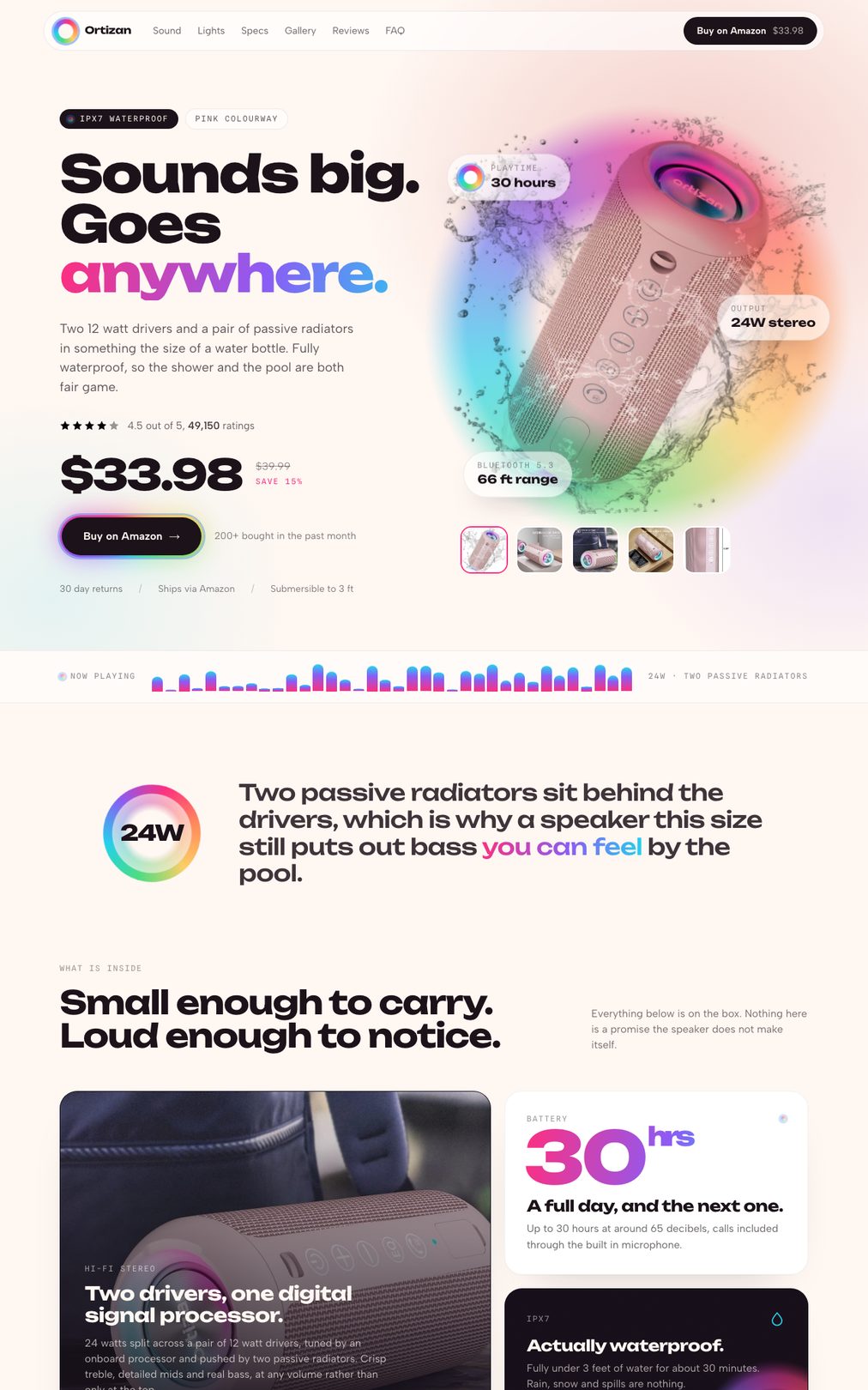
A single HTML page, ready to upload anywhere. The product facts stay grounded in your live listing: the images, the bullets, the price, the rating and the reviews.

jaygptpro.com/amazon-landing-page-demo
The Ortizan X10 landing page built by the skill: hero with the real product photo, the real $33.98 price and the real 49,150 ratings real photos real price
  • Real product data

    Title, images, bullets, price, rating and the actual reviews, pulled straight from your listing.

  • Your attribution link on every button

    Add your Amazon Attribution link once. Every buy button on the page carries it.

  • Email capture

    A VIP-list form on the way to Amazon. Plug in your own email tool.

  • Built for phones

    Sticky buy bar on mobile, scroll animations, FAQ, trust badges. It reads like a brand site, not a template.

  • Then you just talk to it

    "Change the headline." "Add the coupon." "Make the reviews bigger." Claude edits the page for you.

The second pass

Most tools stop at the first draft. This one keeps going.

The first version is always correct and always a little flat. So the skill saves that draft and goes back through the page a second time, on its own.

01

Your best feature gets its own room

The strongest thing about the product stops sharing a row with five others and gets a full section, in a different tone to everything around it.

02

It stops looking like a template

The even grid breaks apart, the gallery turns into a filmstrip you swipe, and the page picks up a visual signature taken from the product itself.

03

It gets the polish you would pay for

Texture under the flat colour, a hero that arrives in sequence instead of all at once, and buttons that answer when you touch them.

Both passes, nothing touched by hand

Now see the actual result.

A real Amazon speaker listing, run through the skill start to finish.

Open the live page
Get the skill

Install once. Then it is one line per product.

Paste this once into Claude Code. After that, the skill is there in every session.

npx skills add JayGPTPro/amazon-landing-page -g

Works on macOS and Windows. Claude Code Desktop or the terminal, either one.

01

Paste the Amazon URL

In any Claude Code chat, in any folder, exactly like the box at the top of this page.

02

Claude opens the listing and builds

It reads the product page in Chrome, downloads the images, writes the page, and opens it in your browser.

03

Make it yours

Add your Amazon Attribution link, connect the email form if you want one, and publish.

Before you run it

You need Claude Code and Chrome. That is basically it.

  • Claude Code, desktop app or terminal.
  • Chrome, connected to Claude Code. The skill reads the listing through your browser. If you already use Claude with Chrome, you are set. If not, ask Claude to connect it: it walks you through the one-time setup.

The installer runs on Node. If you do not have it, ask Claude and it will walk you through that too.

Two things to do after the run

Your link. The buy button ships with the plain Amazon URL. Swap it for your Amazon Attribution link so every click is counted to you.

Your email tool. The form is wired for a field id. Paste the id from your email service and the signups land in your list.