The Video Ad CTR Optimization Hack
Give the skill your product video and your search keywords. You get one version per keyword: the first 4 seconds show what the shopper typed, and your sound and the rest of the video stay the same.
The AI scenes are made by Genrupt, a separate video service: about $1.50 per opening, paid to them.
Before you start
Have these ready. The steps below install everything else.
- A computer, Mac or WindowsPick yours with the switch above. It changes the commands on this page.
- A paid Claude plan, such as ProSee plans. Claude Code runs on it. Step 1 installs Claude Code. The skill works in Claude Code only (the terminal, or the Code tab in the Claude desktop app). The regular Claude chat does not see it.
- A Genrupt account with creditsGenrupt is a separate video service, not mine. It makes the new scenes, and you pay it for them: about $1.50 per opening. Step 4 sets it up.
- A finished product videomp4 or mov, 6 to 45 seconds, landscape (16:9). Sponsored Brands video takes 16:9 only; the skill also works on vertical (9:16) video for other placements.
- Your ASINSo the new scenes show your real product.
- 3 to 10 keywordsPick keywords that change the picture: a food, a person, a place or a use. Keywords that only reorder the same words get the same scene. No list? Claude can suggest some from your listing.
Install Claude Code
Claude Code is the app that runs the skill.
Open your terminal
Mac: press Cmd + Space, type Terminal, press Enter.
Windows: press the Windows key, type PowerShell, press Enter.
Never used one before? Anthropic's terminal guide shows how to open it and paste a command.
Paste this and press Enter
curl -fsSL https://claude.ai/install.sh | bashirm https://claude.ai/install.ps1 | iexIt shows no progress while it downloads. Wait until you can type again. These commands come from Anthropic's official install page; if anything there looks different, follow that page.
Also install Git for Windows. Anthropic recommends it so Claude Code can run its usual commands.
Close the terminal window and open a new one. Then run:
claude --versionYou see a version number. If it says claude is not found, see If something goes wrong.
Sign in
claudeThe first time, Claude Code asks you to log in with your Claude account. Follow the steps it shows. When you are in, type /exit and press Enter to close it for now.
Install the tools the skill uses
ffmpeg cuts and joins the video. numpy and Pillow are two small Python packages that check frames and draw the title. Node.js runs the one-line install in step 3. All free.
The easy way: let Claude Code do it. Type claude, press Enter, and paste:
Install ffmpeg, Node.js, and numpy and Pillow for Python 3, on this computer. Then check that all of them work.It asks before it runs each command. Choose Yes. When it says everything works, go to step 3. Or run the commands yourself:
a. Homebrew
Homebrew installs tools on a Mac. Check if you already have it:
brew --versionIf you see a version number, skip to b. If not, install it (command from brew.sh):
/bin/bash -c "$(curl -fsSL https://raw.githubusercontent.com/Homebrew/install/HEAD/install.sh)"It asks for your Mac password. Nothing shows while you type; that is normal. At the end it may show a Next steps section with a few commands: copy and run them too.
b. ffmpeg and Node.js
brew install ffmpeg nodec. numpy and Pillow
pip3 install numpy pillowIf you see an error that says externally-managed-environment, run this instead:
python3 -m pip install --user --break-system-packages numpy pillowffmpeg -versionThe first line starts with ffmpeg version.
python3 -c "import numpy, PIL; print('ready')"It prints ready.
node --versionYou see a version number.
a. ffmpeg
winget install --id Gyan.FFmpeg -eb. Python
Already have Python 3? Skip this one.
winget install --id Python.Python.3.13 -ec. Node.js
Already have Node.js? Skip this one.
winget install --id OpenJS.NodeJS.LTS -eNow close PowerShell and open a new one, so it finds the new tools.
d. numpy and Pillow
pip install numpy pillowffmpeg -versionThe first line starts with ffmpeg version.
python -c "import numpy, PIL; print('ready')"It prints ready.
node --versionYou see a version number.
Install the skill
Paste this in your terminal, outside Claude Code (if Claude Code is open, type /exit first).
npx skills add JayGPTPro/keyword-openers -gIt uses Node.js from step 2. If it says npx is not found, install Node.js from nodejs.org first, open a new terminal, and run it again.
Start Claude Code with claude and type /keyword. You see keyword-openers in the list.
Connect Genrupt
Genrupt is the AI video platform that makes the new opening scenes. Claude Code talks to it for you.
a. Create your Genrupt account
New to Genrupt? Create your account first, then come back to connect it.
This is my partner link. When you buy credits for the first time, enter code JAY20 in the credit purchase box for 20% extra credits.
My skill is free. Genrupt is a separate service that generates the video, and that part costs money, like any AI video tool: about $1.50 per opening. It stays cheap because you make only the opening, not a whole new video for each keyword. Claude shows you the exact price and waits for your yes before it spends anything. Building the versions is free.
b. Connect it to Claude Code
Paste this in your terminal, outside Claude Code:
claude mcp add --scope user --transport http genrupt https://genrupt.com/api/agent/mcp--scope user makes Genrupt work in every folder. Without it, it only works in the folder you ran the command from.
c. Restart Claude Code and sign in to Genrupt
If Claude Code is open, type /exit. Start it again:
claudeThen type this and press Enter:
/mcpPick genrupt from the list and follow the sign-in steps. Your browser opens. Sign in with your Genrupt account, then come back to the terminal. If the browser does not open, copy the link Claude Code shows and open it yourself.
Type /mcp again: Genrupt shows as connected. Or, outside Claude Code, run:
claude mcp listThe genrupt line ends in ✔ Connected. If it says Needs authentication, do the sign-in again.
Run it
One request makes every version.
a. Put your video in its own folder
For example on your Desktop. Give it a simple name with no spaces, like my-video.mp4.
b. Open Claude Code in that folder
In Terminal, type cd and a space. Drag the folder from Finder into the Terminal window. Press Enter.
Open the folder in File Explorer. Click the address bar at the top, type powershell and press Enter. PowerShell opens in that folder.
Then start Claude Code:
claudec. Type your request
Copy this, then change three things: the file name, your ASIN, and your keywords.
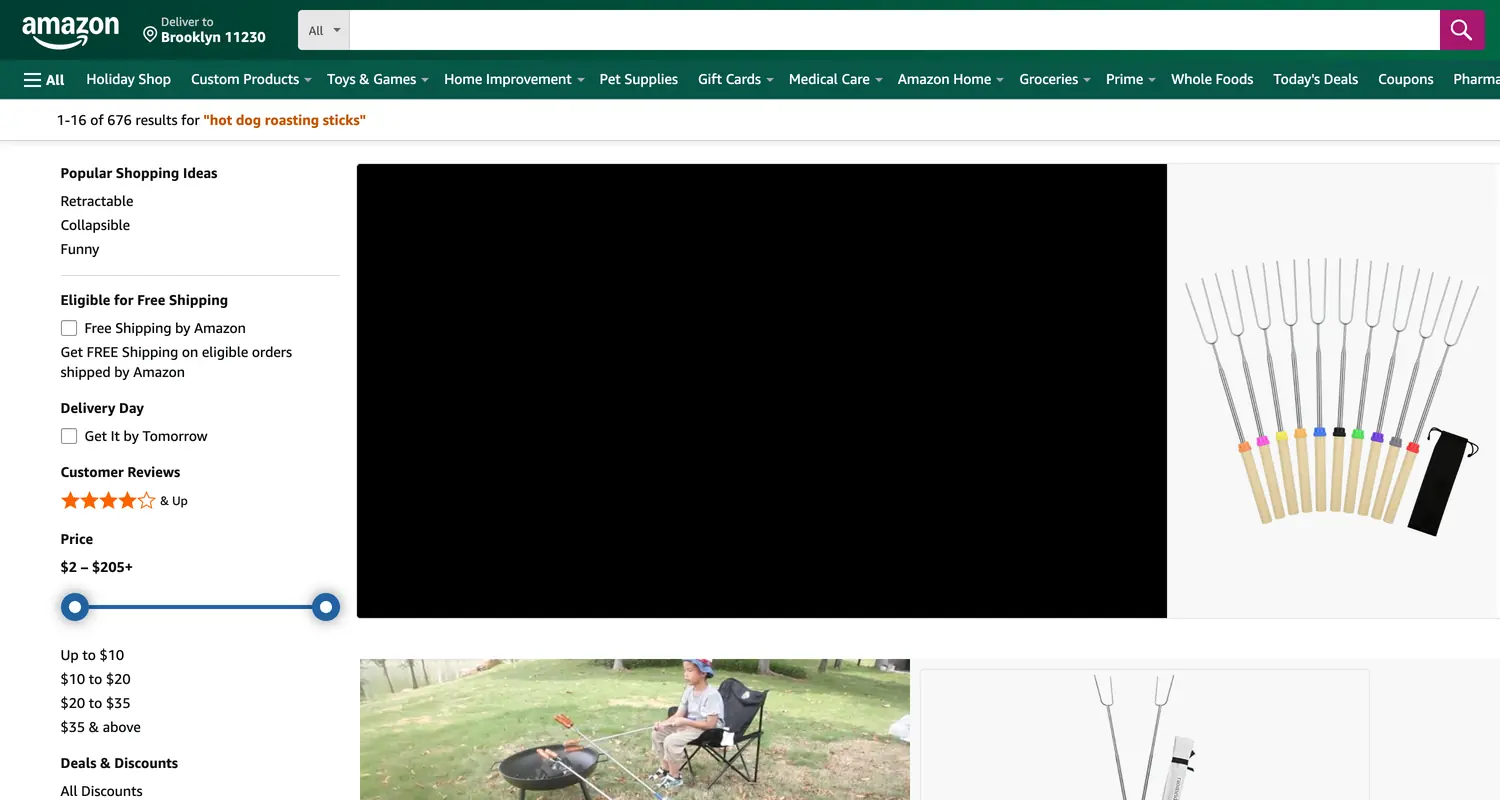
/keyword-openers my-video.mp4, ASIN B0XXXXXXXX, keywords: hot dog roasting sticks, vegetable roasting sticks, bbq roasting sticksClaude Code asks before it runs commands or saves files. Choose Yes.
d. What Claude does next
- It reads your video. It finds your video's own cut nearest 4 seconds and checks what is in the frames it will replace. If a logo, a price or text sits there, it tells you and offers an earlier cut.
- It shows the scenes it will make, one line per keyword. For example: hot dog roasting sticks: a dad and his son holding two hot dogs over the same campfire. Say so if you want one changed.
- It shows the price and waits for your yes. Nothing is spent until you answer.
- Genrupt makes the scenes, using your product photos from the ASIN.
- It builds every version and checks each file: same length as your original, same soundtrack, the rest of the video untouched. Then it looks at each new opening to make sure the product is yours and the title is readable.
- It opens a review page with your original and every version, grouped by keyword.
A folder called keyword-openers next to your video, with:
keyword-openers/out/upload/: one mp4 per keyword, named by the keyword. These are the files you upload.keyword-openers/out/index.html: the review page, with every version and which file goes to which ad group.
One version from the demo: the first 7.5 seconds, muted the way Amazon plays them. Only the opening changes.
Upload to Amazon
In Sponsored Brands video:
- Make one ad group per keyword.
- Target that keyword on exact match, so the shopper who sees the hot dog opening is the one who typed "hot dog".
- Upload that keyword's version as the ad group's video.
- Keep your original video running on the same keywords. That is your control.
- After 1 to 2 weeks, compare click-through rate per keyword. Keep the openings that get more clicks. Stop the rest.
Amazon reviews every video ad before it runs.
What Amazon asks of the file
Your versions keep your original's size, frame rate and sound. If the original meets these, so do they.
| Length | 6 to 45 seconds |
|---|---|
| Size | 1280x720, 1920x1080 or 3840x2160, no black bars |
| Frame rate | 23.976 to 30 frames per second |
| File | .mp4 or .mov, H.264 or H.265, up to 500 MB |
| Audio | AAC, PCM or MP3 |
If something goes wrong
The fixes for the problems people actually hit.
claude is not found
Close the terminal and open a new one, then try again. Still not found? See Anthropic's Troubleshoot installation.
Claude does not know the skill
The skill works in Claude Code only: in the terminal, or in the Code tab of the Claude desktop app. The regular Claude chat and the phone app do not see it. If you installed the skill while Claude Code was open, type /exit and start claude again.
Claude Code will not connect Genrupt
Connect it in the Claude app instead: Settings, Connectors, add a custom connector with this address: https://genrupt.com/api/agent/mcp. Sign in to Genrupt when it asks. Claude Code signed in to the same Claude account then shows Genrupt too.
ffmpeg or python is not found
Close the terminal and open a new one, so it finds the new tools. On a Mac, also run the Next steps commands Homebrew showed at the end of its install.
On Windows, python3 does not work
On Windows the command is python, not python3. The Windows commands on this page already use it.
npx is not found
Install Node.js from nodejs.org, open a new terminal, and run the step 3 command again.
Genrupt is not connected
Run claude mcp list outside Claude Code. If the genrupt line says Needs authentication, start claude, type /mcp, pick genrupt and sign in again. If there is no genrupt line, run the step 4b command again.
My keyword is in Hebrew, Chinese or Arabic
Those letters need an English title on screen. Ask Claude to set an English title_text for that keyword, or to turn the title off.
My keyword is long
More than 5 words is drawn small. Ask Claude for a shorter title for that one.
The title covers the product
Ask Claude to move the title to the top or the bottom. It rebuilds in seconds and costs nothing.
A scene came back wrong
Tell Claude what is off. A new scene costs credits again, so it asks you first.
My keyword is about a moving part (extendable, foldable)
Claude asks for a short clip of the feature in use, or the AI invents how it works. A customer review video from your listing is ideal: 3 to 8 seconds, at least 300 px tall. It adds to the price, and Claude includes it in the price check.
My video is short, or shot on a phone
Your video must be at least 6 seconds long (Amazon's minimum) and have a constant frame rate. Phone and screen recordings often do not. Claude warns you when it reads the video. Then ask it:
Convert my video to a constant frame rate first.I don't want to use Genrupt
The skill still works. Drop in your own clip for each keyword (filmed, stock, or from another tool) and Claude builds the versions.
Stuck on something else
Open Claude Code, paste the error you see, and ask what to do.
Want more AI ideas like this one?
Join my free WhatsApp group. It's a quiet one: AI tips, tools and updates for eCommerce sellers.
Join on WhatsApp