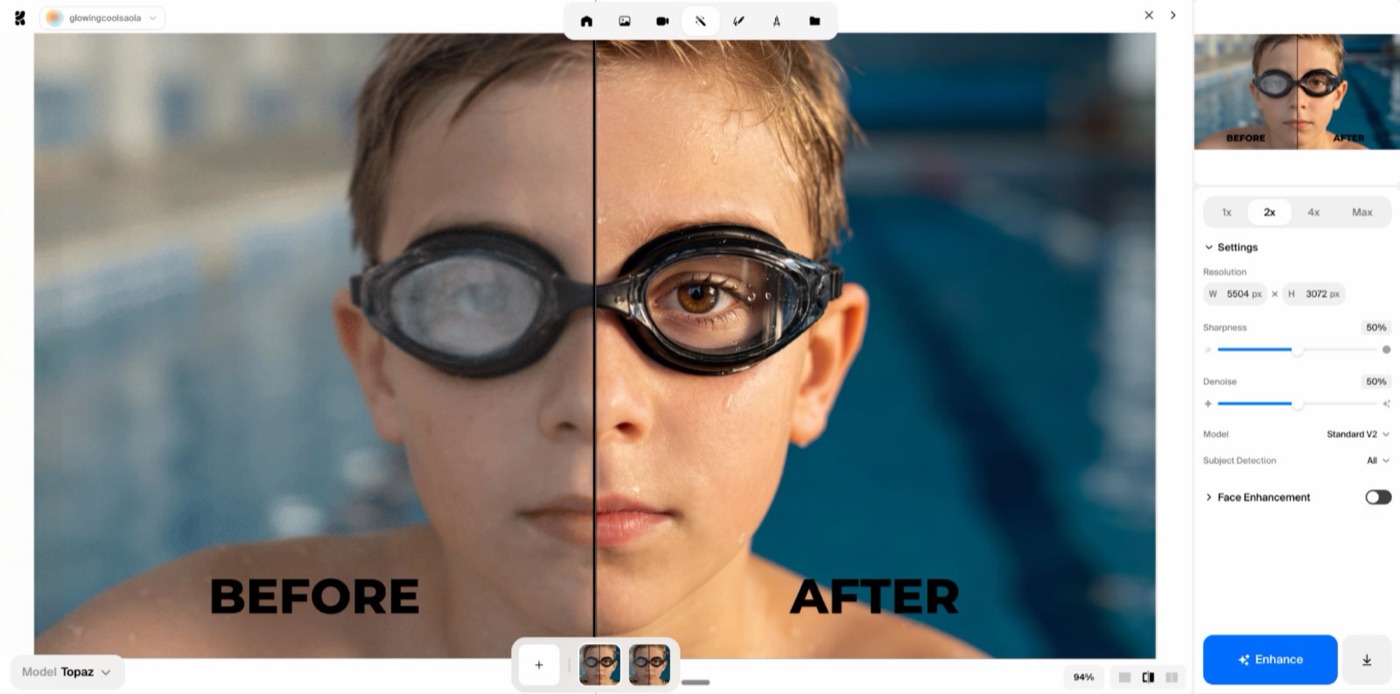
Your AI images are good. Here is how to make them realistic
There is one tool I use almost daily that takes any AI image to a super realistic level: Krea Enhancer.
It’s the single most important step to get your images ready for professional use.
Inside Krea Enhancer there are many different models available but in practice these two are the best for high-end results 👇
1️⃣ Topaz.
When to use it: When your image is already good and you just want to improve quality.
What it does: It sharpens the image and reduces noise while preserving facial identity 100%. It doesn't invent anything new, it just perfectly polishes what already exists.
2️⃣ Topaz Generative.
When to use it: When the image is soft, weak, or missing details like skin texture.
What it does: It adds depth and completes missing textures.
⚙️ Important Setting: Change `Creativity` to 1. This ensures the result stays realistic and avoids that "plastic doll" AI look.
💡 Pro Tip for Video Creators. If you plan to animate your images using Kling, VEO, or any image-to-video tool, always enhance the image first. Sharper Input = Much More Realistic Output 🚀
Try it here: https://www.krea.ai/enhancer
Jay
📲 `To share our WhatsApp group with friends:`
https://chat.whatsapp.com/F1YcpZGHueh2oSEhcsfjc1